
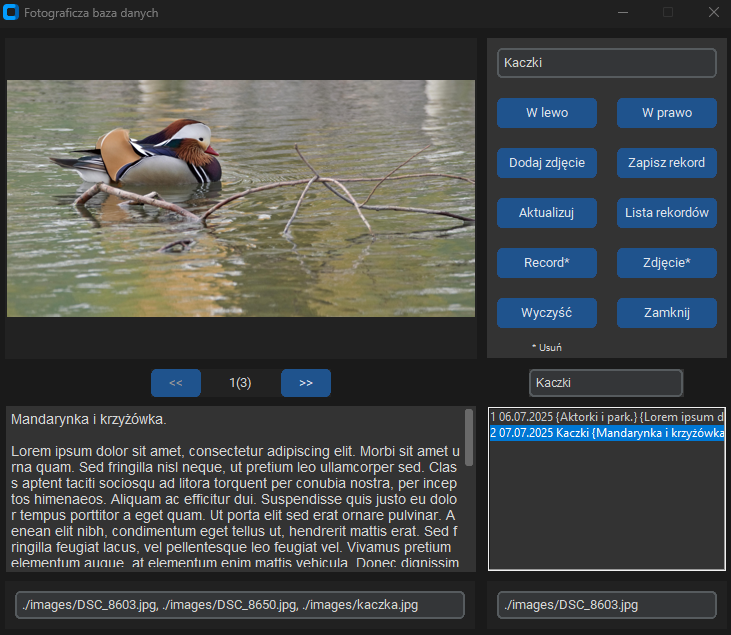
Panel administratora umożliwia edycję rekordów.
- Dodaj zdjęcie – wybierz jedno zdjęcie lub kilka zdjęć jednocześnie.
- Wpisz tytuł – wprowadź tytuł rekordu w polu tekstowym.
- W lewym dolnym rogu okna znajduje się pole tekstowe, w którym możesz opisać rekord.
- Zapisz rekord – zapisuje rekord w bazie danych.
- Wybierając rekord z listy, możesz ponownie go edytować, a następnie zatwierdzić zmiany przyciskiem Aktualizuj.
- Rekord* – usuwa cały rekord.
- Zdjęcie* – usuwa aktualnie wyświetlane zdjęcie z rekordu oraz z bazy danych.
- Wyczyść – usuwa zawartość wszystkich pól edycyjnych i umożliwia wprowadzenie nowego rekordu.
- W lewo / W prawo – zmienia kolejność wyświetlania zdjęć.
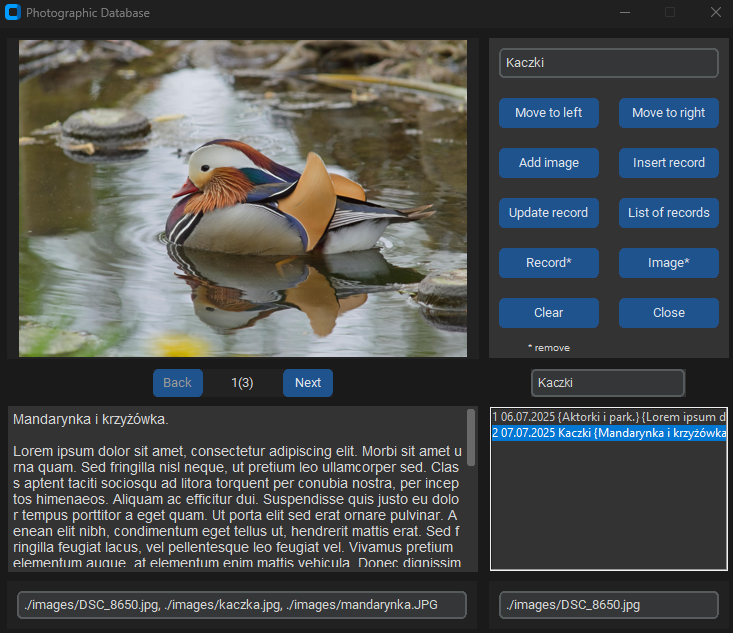
The Administrator Panel allows you to edit records.
- Add Image – select one photo or multiple photos at once.
- Enter Title – enter the record title in the text field.
- In the lower-left corner of the window, there is a text field where you can enter a description of the record.
- Insert Record – saves the record to the database.
- By selecting a record from the list, you can edit it again and then confirm the changes by clicking Update record.
- Record* – deletes the entire record.
- Image* – removes the currently displayed photo from the record and from the database.
- Clear – clears all editing fields and allows you to enter a new record.
- Move to Left / Move to Right – changes the order in which the photos are displayed.